Maintenance software for metalworking
PM Run takes metalworking maintenance to the shop floor, logging straight into SAP PM: the order, the checklist and machine downtime on the technician's phone, and the week scheduled on the Gantt against crew capacity.

What is maintenance software for metalworking
Maintenance software for metalworking organizes the maintenance execution of critical machining, cutting, forming and welding equipment, from the work order to field logging. PM Run does this as a layer on top of SAP PM: the technician receives the order on the phone, runs it with a checklist and confirms it on the spot, and the data flows back to SAP, which remains the central record.
Free tools for maintaining critical machines
For planners who schedule maintenance on presses, lathes and machining centers in spreadsheets: guides to measure the machine and plan real capacity, plus work order templates.
When the spreadsheet can no longer hold the plant's maintenance
The guides show where the week loses ground. These signs show when the problem becomes the path of the order back to SAP PM.
- Preventive work on the press is postponed because production will not release the machineThe order goes back to the queue with no new date, and nobody sees how many preventive hours are piling up.
- The press brake order needs a mechanic and an electrician, and the roster lives in the supervisor's headWhen one of them is missing, the crew arrives incomplete and the job moves to another shift.
- Machining center downtime is written down from memory at the end of the shiftThe downtime in SAP comes from someone's recollection, and the machine's MTBF is no use for decisions.
- The safety clearance for the job sits on a paper formIn an audit, finding which clearance applied to which job turns into a search through folders.
With PM Run, the week is scheduled against capacity and executed on the phone
In the portal, planning sees unassigned orders and planned hours against capacity, assigns them manually or with the Manu AI and reschedules dates on the Gantt. On the phone, the technician follows the checklist, records machine downtime with start and end and fills in the safety form, which can hold the activity until the manager approves it. Everything goes to SAP PM.
What PM Run delivers in metalworking maintenance
Order mirroring IW31
The technician creates and runs the order in the app mirroring the fields of SAP's IW31 screen, with general data, operations and reservations.
Checklist and time per operation
Each line of the operation long text becomes a checklist item, and the hours of each operation are logged during the job, with an attached photo.
Machine downtime recorded
The machine-down notification marks the start of the breakdown, closing the order marks the end and SAP calculates the downtime.
Reservation with bill of materials
Material reservation inside execution, pulling the equipment's bill of materials, with approval status.
Skills, shifts and capacity
The skills matrix records certifications and qualifications per person, and the Gantt shows the capacity of each shift.
Safety form
The form reaches the technician's app and, when configured, blocks the start of the activity until the manager approves it.
The maintenance week scheduled against capacity
This is how planning sees orders, hours and capacity in the Planning portal.
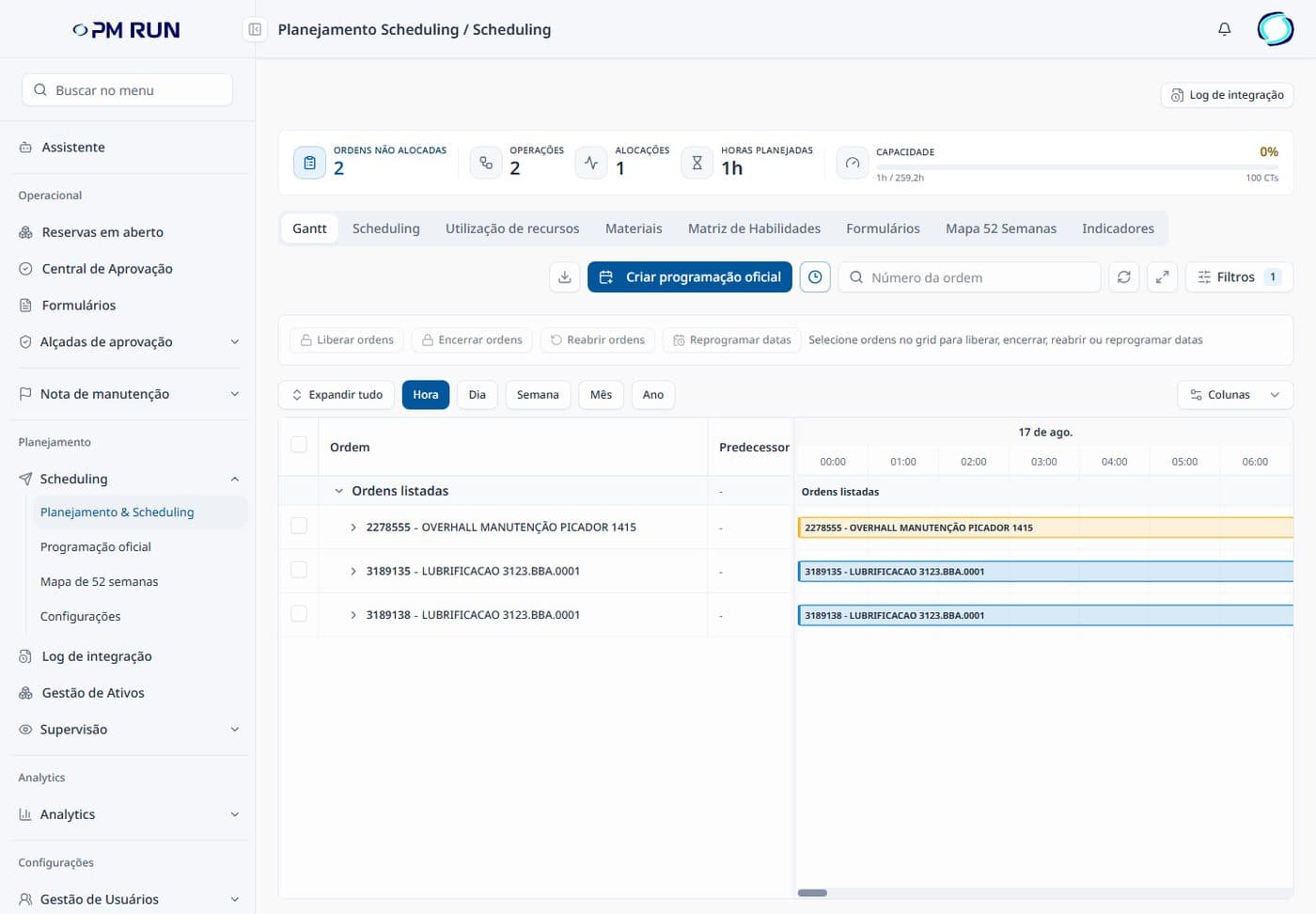
- Scheduling countersUnassigned orders, operations, allocations, planned hours and capacity at the top of the screen.
- Planning tabsGantt, Scheduling, Resource utilization, Materials, Skills Matrix, Forms, 52-Week Map and KPIs.
- Order actionsRelease, close and reopen orders and reschedule dates on the same screen.
- Official scheduleThe button to create the official schedule and the Integration Log stay within planning's reach.
- Gantt at several scalesView by hour, day, week, month and year.
Metalworking maintenance on paper and in PM Run
| Maintenance routine | On paper and spreadsheet | With PM Run |
|---|---|---|
| Weekly schedule | Spreadsheet with no capacity count | Gantt with planned hours and capacity |
| Work order | Printed and re-entered in spreadsheets | Created and run in the app, mirroring IW31 |
| Confirmation | Typed in hours later | At the moment of execution, per operation |
| Machine downtime | Noted from memory | Recorded with the start and end of the breakdown |
| Safety clearance | Paper form in a folder | Form in the app, with manager approval |
| Material | Loose requisition | Reservation with the equipment's bill of materials |
| Record in SAP | Retyped afterward | Integrates with SAP PM, validated in the Integration Log |
Bruning Tecnometal: SAP PM go-live in maintenance
Bruning Tecnometal had a lot of manual work to enter information into SAP and came to PM Run to bring digital transformation to maintenance. The project ended with the SAP PM go-live.
Bruning Tecnometal case summary
Frequently asked questions
Does PM Run replace SAP PM in metalworking?
No. PM Run is the execution, mobility and planning layer that runs on top of SAP PM. SAP remains the central record of orders, notifications and assets. PM Run takes execution to the field and returns the data to SAP, without creating a parallel system.
Does PM Run serve the metalworking industry?
Yes. Bruning Tecnometal, a manufacturer in northwestern Rio Grande do Sul, Brazil, that serves the agricultural, road transport, automotive and construction segments, completed its SAP PM go-live in maintenance with PM Run.
Can the technician work without internet in the plant?
Yes. After sync, the app works offline on the shop floor: the technician runs the order, fills in the checklist and confirms the job. When the connection returns, the data goes up to SAP PM.
How does PM Run handle critical machining equipment?
Through the order and the reading taken at the equipment itself. The order mirrors SAP's IW31, with operations and reservations. The technician identifies the machine by QR Code and enters the measuring point reading, and a value outside the limit requires a notification. When the machine stops, the machine-down notification marks the start of the breakdown and SAP calculates the downtime.
Does PM Run control the safety clearance for a job?
PM Run sends safety forms to the app and, when configured, blocks the start of the activity until the manager approves the form. The safety procedure and the lockout criteria remain defined by the company.
Is there a free guide to calculate MTTR and MTBF?
Yes. PM Run's guide covers both formulas, a step-by-step numerical example, the difference from MTTF and how to build the MTTR and MTBF spreadsheet.
When should metalworking replace the scheduling spreadsheet with software?
When the spreadsheet can no longer answer what the week needs to know: how many preventive hours are piling up, who holds the qualification for each order and which machine stop reached SAP with a start and an end. At that point, software schedules orders against capacity and takes execution from the phone to SAP PM.
Related content
Book a demo of PM Run for your metalworking maintenance
We show the order mirroring IW31, field execution and integration with your SAP PM, using data from your operation.