+ 10
years
Improving maintenance for large industrial companies
Implementation and support delivered by the PM Run team itself, in operations that run maintenance in SAP PM.
App to execute orders online or offline, follow checklists, log work, and capture field evidence, with synchronization to SAP PM.
The technician executes, books time and attaches evidence on the phone, and the supervisor sees in the portal what has already reached SAP PM.
See how the same technician, in the same 8-hour shift, delivers completely different outcomes with and without PM Run.
8-hour shift (07:00-15:00).
Work orders, time booking, evidence, and follow-up in one flow, without relying on paper, spreadsheets, or rework.
Create the notification with cause, symptom and part catalogs and the order mirroring IW31, even with no signal.
Photos from the camera or gallery and PDFs attached to the notification and the order, sent to SAP with the confirmation.
The timer runs while the technician works, pauses when the job stops and becomes the operation's confirmation.
Reserve material from the equipment's bill of materials without leaving the order, with an approval status.
The technician answers before starting and, depending on the configuration, execution only opens after approval.
The technician installs, dismantles and replaces equipment in the SAP hierarchy from the app.
The portal shows on a map where the technician was when each confirmation was made.
Each order, notification and measurement document appears as success or failure, so the supervisor knows what reached SAP.
Notifications appear as a kanban or list by status, and the people responsible get an email when one sits untreated.
Material reservations, final confirmations and safety forms can go through an approver, according to the approval levels set in the portal.
PM Run delivers execution data ready for you to build your own MTTR, MTBF, backlog and workload dashboard.
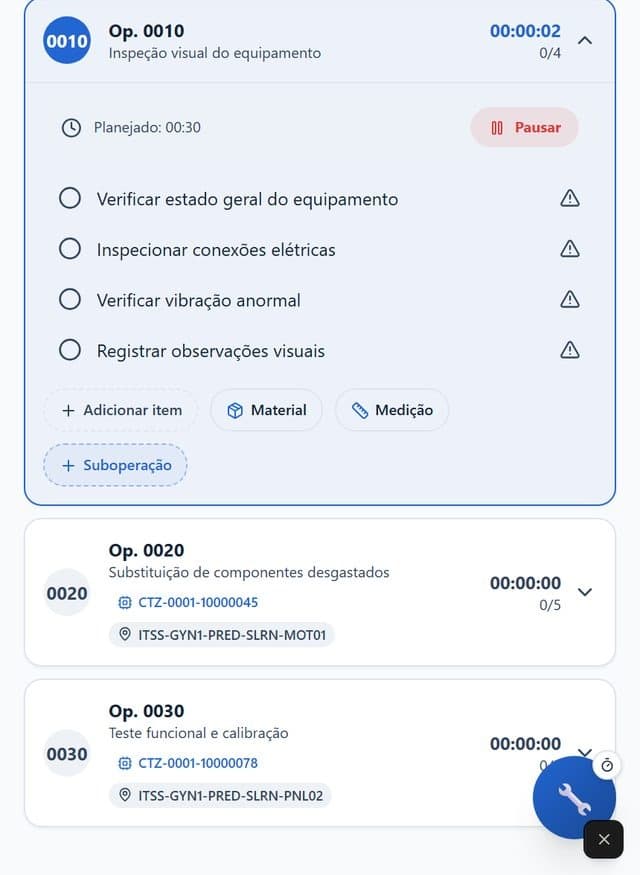
The technician receives the order in the app, follows the checklist, attaches the photo and logs time during the job, even offline. Sync takes everything to SAP PM, and the manager sees notifications on the portal board and each submission in the Integration Log.
While work orders still run on paper, standardize execution with these templates and a guide on how late reporting distorts KPIs.
"PM RUN became a strategic tool for Citrosuco, helping to optimize processes and increase operational efficiency."
Mauricio Felippe, Maintenance Planner at Citrosuco
"Time is precious for us. While the technician is doing the maintenance, he already confirms the order."
Carlos André, Maintenance Management at Rivelli Alimentos
Improving maintenance for large industrial companies
Implementation and support delivered by the PM Run team itself, in operations that run maintenance in SAP PM.
Connected operations at enterprise scale
Technicians, planners and managers who execute and schedule maintenance on top of SAP PM.
Yes. The technician executes the order, fills in the checklist and attaches the photo without signal. When the connection returns, the app syncs the order and the time confirmation with SAP PM. Offline work requires a prior sync of the base data.
No. PM Run runs on top of SAP PM: the order, the notification and the confirmation stay in SAP, and the app takes that flow to the technician's phone.
Android and iOS, in Portuguese, English and Spanish.
Yes. The technician attaches a photo from the camera or the gallery, and the file goes to SAP with the confirmation. Attachments cover images and PDF, not video.
Yes. PM Run offers three free maintenance work order templates in Word, Excel and PDF, to standardize the order while it still runs on paper.
You see the order executed with checklist and photo, even with no signal, and the Integration Log showing each submission that reached SAP PM.
Used by leading operations in their sectors


We use essential cookies and, with your consent, analytics and marketing cookies to measure usage and personalize contact. Privacy Policy