Maintenance software integrated with SAP PM
PM Run takes the SAP PM order to the technician's phone, builds the planner's week on a Gantt by capacity and sends time confirmations, notifications and readings back to SAP, with each submission checked in the Integration Log.
SAP PM stays as the central record. PM Run handles the work around it: the weekly schedule, field execution and the supervisor's follow-up.
Where the SAP PM routine loses time today
- Every week the planner exports SAP orders to a spreadsheet, and the schedule the team follows never goes back to SAP with the new dates.
- Technicians write the job on paper and someone types the hours into SAP at the end of the shift, so MTTR reflects what was remembered.
- Inspection readings stay on a clipboard, and an out-of-limit measurement only becomes a notification days later.
- Material is requested by message, and the reservation is not tied to the order in SAP.
With PM Run, the order goes from SAP to the phone and comes back confirmed
The planner schedules the week on a Gantt against team capacity and sends the official schedule to SAP. The technician executes the order in the app with checklist, photo and time confirmation, even offline, and the Integration Log shows the result of each submission.
What PM Run does on top of SAP PM
Field mobility for maintenance teams
Execute work orders in the app, confirm hours by operation during the job and attach images and PDFs, online or offline.
Notification and work order creation
Create the notification with cause, symptom and part catalogs and open the order in the app when an emergency shows up in the field.
Mobile measurement documents
Enter the measuring point reading through the equipment's QR Code. An out-of-limit reading requires a notification.
Planning and scheduling
Organize capacity, shifts, absences and skills and use the allocation suggested by Manu to move planners out of spreadsheets.
Equipment master data and readings
Look up the equipment master data and the measuring point history in the app, based on what already lives in SAP PM.
Execution supervision
Follow notifications, orders and activity progress in the portal, without building reports by hand.
SAP PM on the technician's phone
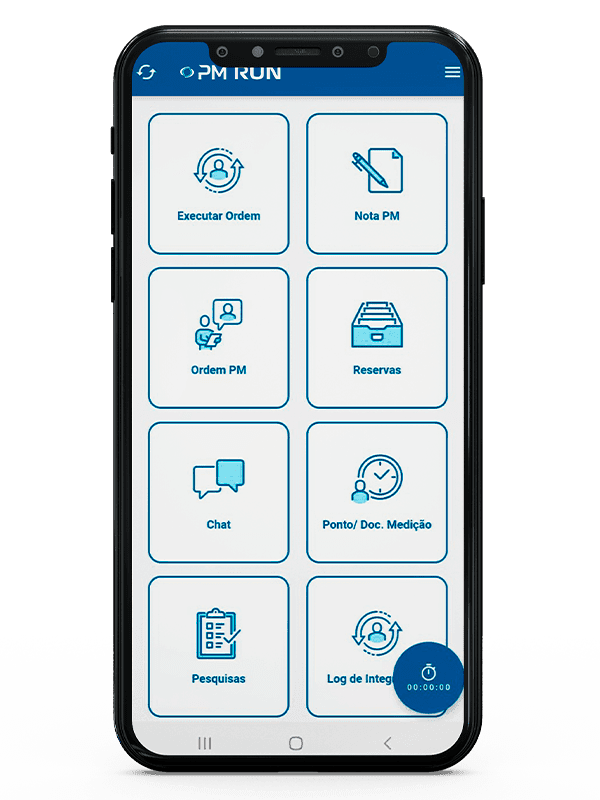
- Execute order and PM orderThe SAP PM order opened and executed in the field.
- PM notificationThe maintenance notification recorded where the failure shows up.
- Reservations and measurement documentsMaterial and measurements entered without going back to the office.
- Integration logThe result of each submission to SAP, visible to whoever entered it.
To run the SAP PM you already have
Free guides for teams that run maintenance in SAP, from the module to the order lifecycle.
What changes for the planner, the technician and the supervisor
SAP PM stays as the record, and the work around it no longer depends on spreadsheets and retyping.
The weekly schedule leaves the Gantt and reaches SAP as the official schedule
Time is confirmed during the job, by operation, not at the end of the shift
An out-of-limit reading becomes a notification right away, in the app
The material reservation starts inside the order, from the bill of materials
The Integration Log shows what reached SAP and what failed
The supervisor follows notifications and orders in the portal, without building reports by hand
How PM Run talks to your SAP PM
A dedicated package in your SAP and the interfaces your IT already uses
The PM Run package is installed in the customer's SAP environment, and communication uses the interfaces your IT already manages, such as SOAMANAGER, PI, CPI or RFC.
Integration with SAP PM for notifications, work orders, confirmations, reservations and measurement documents
Support for SOAMANAGER, PI, CPI, RFC, and enterprise integration platforms
Integration Log with the result of each submission
Orders created in the app with the fields of SAP's IW31 screen
Results from customers running PM Run on SAP PM
PM Run users
In industrial operations that run maintenance in SAP PM.
less time spent on manual tasks at Rivelli Alimentos
The team receives the order on a tablet and confirms it during the maintenance itself.
order confirmation rate at Citrosuco
Notifications and photos recorded directly on the order from the phone, with automatic sync to SAP PM.
"PM RUN became a strategic tool for Citrosuco, helping to optimize processes and increase operational efficiency."
Mauricio Felippe, Maintenance Planner at Citrosuco
"While the technician is doing the maintenance, he already confirms the order. This made our daily routine much faster and reduced waste of material and time."
Carlos André, Maintenance Management at Rivelli Alimentos
Who uses PM Run on top of SAP PM
Maintenance technician
Gets the order that already lives in SAP on the phone, follows the checklist and confirms hours by operation during the job, even with no signal.
Planner and scheduler
Builds the week on the Gantt against crew capacity, with shifts, absences and skills, and sends the official schedule to SAP without exporting a spreadsheet.
Supervisor and SAP PM key user
Follows notifications and orders in the portal and checks in the Integration Log what reached SAP and what failed.
Questions that usually come up before the demo
Does PM Run replace SAP PM?
No. SAP PM remains at the center. PM Run runs on top of it to take execution to the field, organize scheduling and follow up on maintenance.
Which processes does PM Run integrate with SAP PM?
Notifications, orders, confirmations, reservations and measurement documents, through SOAMANAGER, PI, CPI or RFC, with the Integration Log marking each submission as success or failure.
Does PM Run work for field teams?
Yes. The technician executes the order, confirms hours, attaches photos and PDFs and enters measurements on the phone, even offline.
Does PM Run help the planning team?
Yes. The planner builds the week on the Gantt with capacity, shifts, absences and skills, uses the allocation suggested by Manu and sends the official schedule to SAP.
Does PM Run include supervision and reporting features?
Yes. Supervisors follow notifications, orders and activities in the portal. For KPIs, PM Run delivers ready-to-use data (MTTR and MTBF by equipment, backlog by criticality, costs and workload) for your team to build its own dashboard.
Is there a free guide on running SAP PM better?
Yes. The PM Run blog has an SAP PM module guide covering assets, maintenance plans, work orders and KPIs.
See a work order leave the schedule and come back to SAP PM confirmed
In the demo you follow one work order leaving the schedule, being executed on mobile and landing back in SAP PM with no re-entry.
Used by leading operations in their sectors


