SAP asset management with field execution
PM Run takes equipment, functional locations and measuring points from SAP PM to the technician's phone and returns readings, notifications, orders and photos to SAP, which remains the asset record.

What SAP asset management with PM Run means
Asset management in SAP organizes equipment, functional locations, measuring points and maintenance history inside SAP PM and SAP EAM. PM Run is the execution and mobility layer over these objects: it takes the asset to the technician's phone and returns notifications, orders, readings and photos to SAP, which remains the central asset record. PM Run is not an EAM.
Free guides to manage assets in SAP PM
For planners and SAP PM analysts who look after asset master data, readings and criticality.
When the asset in SAP stops matching the field
SAP PM holds the asset master data. These are the signs that the problem has become the path of data between the equipment and SAP.
- Measuring point readings go on a clipboard and are typed in laterThe measurement document reaches SAP late, and an out-of-range reading only becomes a notification when someone notices.
- An equipment swap stays on paper until someone posts it in SAPMeanwhile, the SAP structure shows the old equipment at the functional location, and the next notification lands on the wrong asset.
- Failures are described in free text, with no catalogThe asset history turns into loose text, and nobody can analyze the equipment's failures by object part, damage and cause.
- Equipment photos sit in a network folderThe evidence exists, but it is not on the notification or the order when the planner opens the asset history.
With PM Run, the SAP asset goes to the field and comes back up to date
The technician identifies the equipment by QR Code, records the measuring point reading, opens the notification with cause and damage and attaches the photo during the job. If a reading is out of range, the app requires a notification. On sync, everything goes to SAP PM, checked in the Integration Log.
What PM Run does on top of SAP PM asset objects
Features that work on the equipment, functional locations and measuring points of SAP PM itself, with no parallel registry.
Technical object in the field
Look up equipment and functional locations by QR Code, hierarchy or list, with the SAP master data.
Install, dismantle and replace
Swap one piece of equipment for another in the SAP structure from the app and choose the functional location that receives the removed unit.
Measuring point and document
Record the reading by equipment or location. When the value falls outside the point's limits, the app requires a maintenance notification.
Notification with machine down
The notification marks the start of the breakdown, closing the order marks the end, and SAP calculates the downtime. The failure is classified by object part, damage and cause.
Asset documents during the job
The app shows the PDFs and images linked through SAP DMS to the equipment, task list, notification and order.
Integration Log
Every notification, order and measurement document shows as success or failure, so the planner knows the asset data reached SAP.
The measuring point in the technician's hands
This is how the measuring points of each piece of equipment appear in the app.
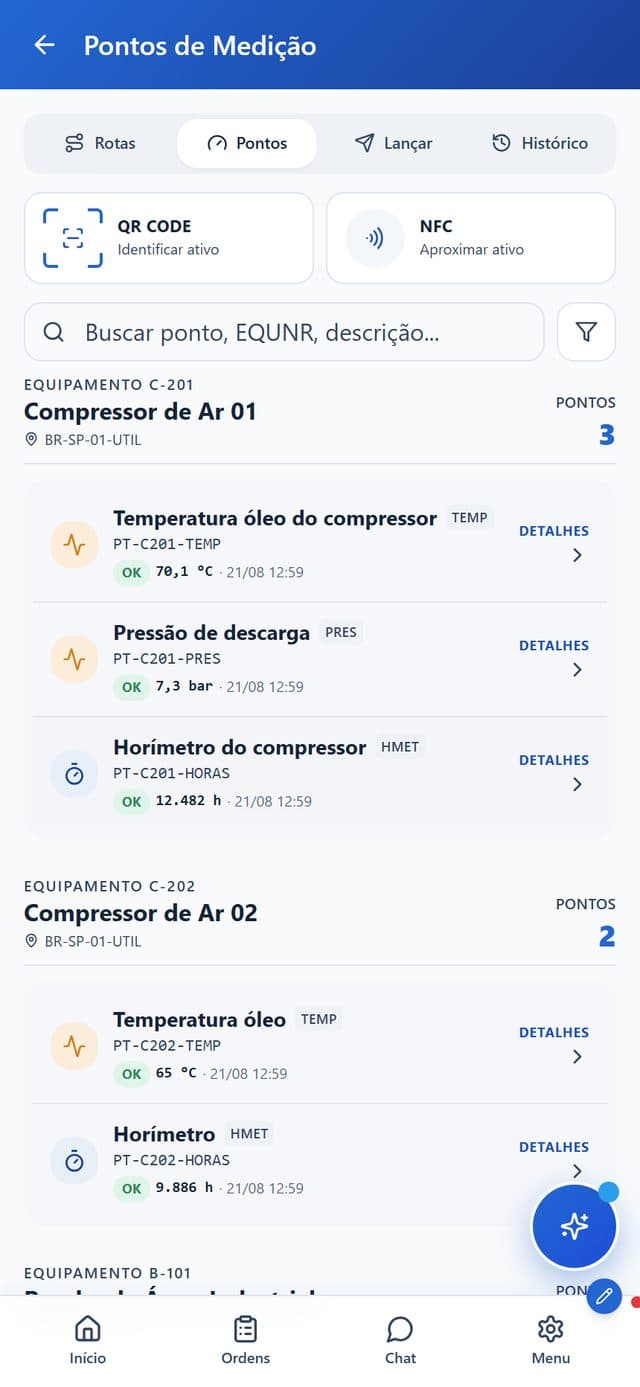
- Asset by QR Code or NFCThe technician identifies the equipment by scanning the QR Code or tapping the phone on the NFC tag.
- Search by point or equipmentSearch finds the point by its code, the equipment number or the description.
- Last value and statusEach point of the compressor shows the last reading, its date and an OK status.
- Routes, points, entry and historyFour tabs at the top of the screen, from the list of points to the reading history.
How the asset data reaches SAP complete
- 1
The asset is already in SAP PM
Equipment, functional location and measuring point come from SAP itself. PM Run reads the technical object, with no re-registration.
- 2
The technician identifies the asset in the field
By QR Code on the equipment, by hierarchy or by list, right where the asset is.
- 3
Records reading, notification and photo on the spot
Measurement document, notification with cause and damage and photo, all at the equipment.
- 4
Executes and confirms the order in the app
The order reaches the phone with checklist and time confirmation per operation, online or offline.
- 5
Syncs with SAP PM
Notification, order, reading and photo go up to SAP, and the Integration Log shows whether each submission worked.
Asset management in SAP without and with PM Run
| Asset routine | SAP in the GUI, no mobility | With PM Run |
|---|---|---|
| Asset identification in the field | Note on paper, typed in later | QR Code on the equipment and SAP hierarchy in the app |
| Measurement reading | Clipboard or spreadsheet, retyped into SAP | Measurement document in the app, at the asset |
| Out-of-range reading | Depends on someone noticing | The app requires a notification |
| Equipment swap | Posted in SAP after the job | Installation and replacement from the app, in the SAP structure |
| Asset photos and documents | Network folder, outside SAP | Photo during the job and DMS documents in the app |
| Failure record | Free text, no standard | Notification with machine down, object part, damage and cause |
| Data arrival in SAP | Manual, prone to delay | Sync checked in the Integration Log |
Asset management in SAP or a standalone EAM: how to decide
| Criterion | Standalone EAM (parallel system) | Asset management in SAP with PM Run |
|---|---|---|
| Where the asset registry lives | Its own base, migrated and reconciled with SAP | In SAP PM or SAP EAM itself, with no parallel registry |
| Maintenance history | Split between the EAM and SAP | Complete in SAP, with field evidence |
| IT governance | One more system to audit, integrate and maintain | SAP remains the single system of record |
| Field execution | Depends on what the EAM offers | Readings, photos and notifications at the asset, synced to SAP |
| When it makes sense | Companies without SAP or without SAP PM in place | Companies already running SAP PM or SAP EAM that want mobility without switching systems |
Asset data in the field, at two plants running SAP PM
At Citrosuco, technicians started recording notifications and photos directly on the order from their phones, with automatic sync to SAP PM.
Order confirmation rate above 95%
Citrosuco
At Rivelli, the team started receiving the order on a tablet and confirming it during the maintenance itself.
50% reduction in time spent on manual tasks
Rivelli Alimentos
Frequently asked questions
Is PM Run an EAM?
No. PM Run is the execution and mobility layer on top of SAP PM and SAP EAM. It takes the asset objects (equipment, functional location and measuring point) to the field and returns notifications, orders, readings and photos to SAP, which remains the asset record.
Do I need to re-register the assets in PM Run?
No. The equipment, functional location and measuring point come from SAP PM itself. PM Run reads the technical object and the SAP hierarchy and operates on them, without creating a parallel asset registry.
How does PM Run track the condition of an asset?
Through the measuring point readings technicians record in the field, with the last value and status of each point. When a reading falls outside the limits set for the point in SAP, the app requires a maintenance notification, so the planner sees the anomaly without waiting for data entry.
How does PM Run make sure the asset data reached SAP?
Through the Integration Log, which flags every notification, order and measurement document as success or failure. That way the planner confirms that the reading, photo and failure recorded in the field reached SAP PM.
Does PM Run work with SAP EAM (Enterprise Asset Management)?
Yes. PM Run runs on top of SAP PM and SAP EAM: it uses equipment, functional locations and measuring points from the ERP and returns complete notifications, orders and readings, with no parallel asset registry.
When does an EAM separate from SAP make sense?
When the company does not run SAP or has not implemented SAP PM yet. For teams already on SAP PM or SAP EAM, switching systems means migrating the asset registry and keeping a second record to reconcile. The alternative is to keep SAP as the single system and add the field execution layer, which is what PM Run does.
Is there a free guide to SAP PM asset objects?
Yes. PM Run's blog explains how SAP PM objects connect assets, plans and work orders, how to structure measuring points and measurement documents from IK01 to IK11 and how to build an asset criticality matrix with a worked example.
When do measurement spreadsheets stop working?
When readings reach SAP only after the shift, an out-of-range value depends on someone noticing and an equipment swap shows up late in the SAP structure. At that point, recording readings, notifications and installations in the app, at the equipment, removes the retyping and keeps the asset history in SAP.
Related content
Book a demo and see the SAP PM asset on the technician's phone
We show equipment, functional locations and measuring points leaving SAP PM for the app and coming back to SAP with readings, notifications and photos.