Maintenance management system for teams running SAP
For teams running SAP, PM Run plays the role of the maintenance management system on top of SAP PM: orders reach the technician's phone, scheduling runs on a Gantt and the data goes back to SAP verified, with no parallel asset base.
What is a maintenance management system
A maintenance management system, or CMMS, is the software that organizes maintenance orders, assets, plans and history. Companies running SAP already have that central record in SAP PM. PM Run is the execution and planning layer that makes it work in practice: orders reach the technician's phone, scheduling runs on a Gantt and confirmations return validated to SAP.
Free guides to organize maintenance management
For maintenance managers and planners who want to measure the operation before choosing a system.
When the spreadsheet next to SAP stops working
SAP PM holds orders, plans and assets. These are the signs that day-to-day management has moved outside it.
- The weekly schedule is built in a separate spreadsheetCapacity, shifts and absences sit in a spreadsheet with no link to the SAP orders, and every priority change has to be redone by hand in both places.
- Technicians confirm orders only at the end of the shiftConfirmations reach SAP from memory, and the time and cost of each order reflect what someone remembered.
- Every KPI requires exporting and cross-referencing spreadsheetsMTTR and backlog depend on who built the file, and each area brings a different number to the meeting.
- A standalone CMMS proposal requires re-registering the assetsThe registry ends up in two systems, and the audit asks which history counts.
With PM Run, maintenance management runs on SAP PM itself
Planners schedule the backlog on a Gantt with the team's capacity, technicians execute and confirm the order on mobile, even offline, and data returns to SAP checked in the Integration Log. Execution data is ready for you to build your own KPI dashboard.
What the maintenance management system covers in PM Run
Each area connected to SAP PM, from planning to field evidence.
Digital work order
Creation mirroring IW31, execution with checklists and confirmation per operation on mobile.
Field execution, online and offline
Android and iOS app with notifications, photos, QR Code and measurement documents, even without signal in the plant.
Planning and scheduling
Backlog, Gantt, team capacity and criticality-based prioritization, with the official schedule integrated with SAP.
This period's preventive orders
Preventive orders defined in SAP PM are scheduled, distributed by capacity and executed in the app.
Data for KPIs
MTTR and MTBF by equipment, backlog by criticality and costs, ready and automated for you to build your dashboard.
Validated integration
SAP package /ITSSPM/ with integration via SOAMANAGER, PI/CPI or RFC and verification in the Integration Log.
Maintenance scheduling in the portal
This is how planners see the order backlog on the Planning & Scheduling screen.
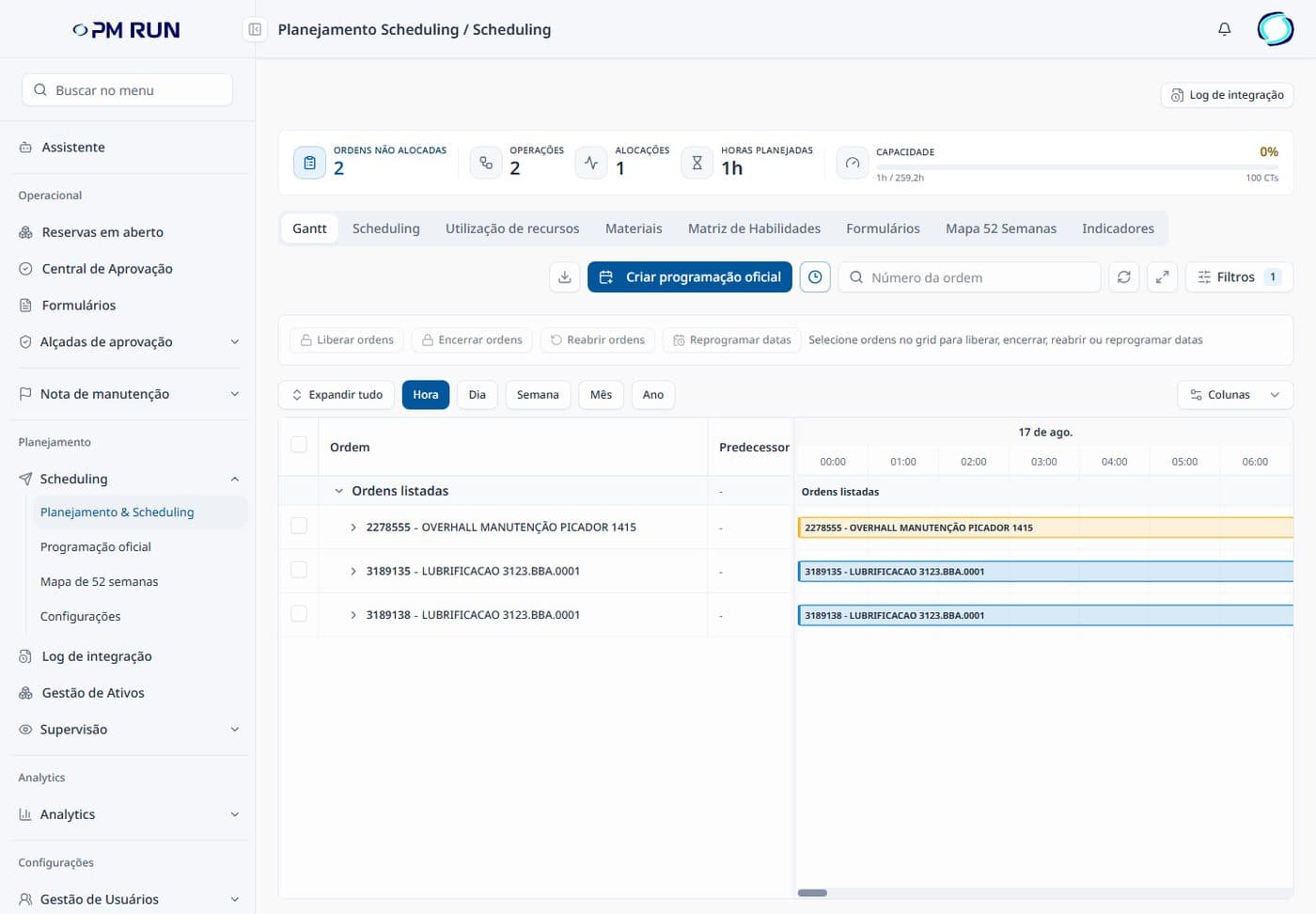
- Backlog and capacity at the topUnallocated orders, operations, allocations, planned hours and the team's capacity.
- Gantt by hour, day, week, month and yearEach order shows as a bar in the period it was scheduled.
- Official scheduleOne button creates the official schedule, which stays integrated with SAP.
- Actions on ordersRelease, close and reopen orders and reschedule dates from the selection in the grid.
- Supporting tabsResource utilization, materials, skills matrix, 52-week map and indicators on the same screen.
Standalone CMMS versus PM Run on top of SAP PM
| Criterion | CMMS separate from SAP | PM Run on SAP PM |
|---|---|---|
| Asset registry | Re-registered and maintained in two systems | Single, the SAP PM registry |
| Work order | Created outside and pushed to the ERP via interface | Mirrors the SAP order from creation to closing |
| Maintenance history | Split between two bases | Complete in SAP, with field evidence attached |
| Integration | Interface project owned by the customer | /ITSSPM/ package with Integration Log validation |
| KPIs | Spreadsheets exported and cross-referenced from two sources | Execution data ready for your dashboard |
| Technician's routine | One more system to learn | Mobile app, online and offline, with checklists |
Maintenance management with reliable data in SAP
At Citrosuco, technicians started recording notifications and photos directly on the order from their phones, with automatic sync to SAP PM.
Order confirmation rate above 95%
Citrosuco
At Rivelli, the team started receiving the order on a tablet and confirming it during the maintenance itself.
50% reduction in time spent on manual tasks
Rivelli Alimentos
Frequently asked questions
Is PM Run a CMMS?
PM Run is the execution, mobility and planning layer that runs on top of SAP PM. For companies running SAP it plays the role expected from a CMMS (orders, execution, scheduling and history) without creating a parallel asset base. For operations without SAP, a standalone CMMS is the better fit.
What is the difference between a maintenance management system and a CMMS?
Conceptually, none. CMMS stands for Computerized Maintenance Management System. Both names describe the same software category.
Do I need to replace SAP to adopt a maintenance management system?
No. SAP PM remains the central record of orders, notifications, plans and assets. PM Run connects to it and solves what the ERP alone does not cover well: field execution on mobile, visual scheduling with capacity and confirmation at the moment of maintenance.
How does PM Run integrate with SAP PM?
Through its own SAP package, /ITSSPM/, with integration via SOAMANAGER, PI/CPI or RFC, depending on the company's architecture. Every movement can be verified in the Integration Log, which shows whether the order, the notification and the confirmation reached SAP.
Which industries already run it?
Any industrial operation using SAP PM. There are published cases in food (Rivelli) and agribusiness (Citrosuco), with field execution integrated with SAP.
Is there a free guide to organize maintenance management?
Yes. PM Run's blog has a complete maintenance management guide with pillars, weekly routines and core KPIs, a guide to 12 maintenance KPIs with formulas and target ranges and a backlog guide with a full numerical example.
When should you replace maintenance spreadsheets with a system?
When the weekly schedule lives in a spreadsheet next to SAP, confirmations arrive at the end of the shift and every KPI depends on exporting and cross-referencing files. For teams already on SAP, the next step is to schedule the week on PM Run's Gantt and execute orders on mobile, with the record going back to SAP PM and no parallel base.
Related content
Book a demo and see the maintenance management system running on your SAP
We show the order on the technician's phone, Gantt scheduling and data arriving validated in SAP PM.