PM Run pricing and what else to budget to run it on SAP PM
PM Run has no public price list: pricing comes in a proposal that separates implementation and subscription, based on the modules and scope. SAP licensing for technicians, devices, network and internal staff stay in your internal budget, outside the proposal.
How much PM Run costs
PM Run's price isn't published because it depends on the modules you choose (Mobility, Planning, routing and AI) and on the project scope. It's sold by fixed-scope proposal, with implementation and subscription quoted separately, and PM Run's cloud servers are part of it. Unlike a standalone CMMS, PM Run runs on top of SAP PM, so SAP licensing, devices, network and internal staff sit in your own budget.
Tools to budget maintenance software integrated with SAP
Use these to take the full project cost to leadership: the software, SAP licensing for technicians and the expected return.
Costs that show up after signing when nobody budgeted them
The software proposal is one part of an SAP PM budget. When these project costs stay outside the approved amount, they turn into extra requests in the middle of implementation.
- SAP licensing for technicians was left until after the purchaseThe metric that applies to app users (named user, FUE or SAP Digital Access) depends on your SAP contract, and its cost lands outside the approved budget.
- The chosen integration runs through SAP Integration SuiteIf the Integration Suite subscription and consumption weren't in the IT budget, the integration method goes back up for discussion after the project has started.
- Phones were bought without spares, device management or data plansBreakage replacement, MDM and data plans become a new expense for every device that goes to the field.
- SAP DMS wasn't activatedPhotos taken in the app need DMS to be attached to the notification and the work order, and activating it, with the recommended content repository, becomes extra work for IT.
- Nobody was set aside for user acceptance testingKey users and IT split their calendar with plant routine, and integrated testing waits for whoever signs off.
The PM Run proposal states what stays with your company
The PM Run technical proposal lists what stays with the customer, from access to the SAP environments to DMS activation and firewall rules. With that list in hand, IT and maintenance budget SAP licensing, devices, network and staff before signing.
What the PM Run proposal includes
The proposal is built as a fixed scope, with the modules your operation chooses.
Mobility
App and portal for the field, online and offline, on Android and iOS, in Portuguese, English and Spanish.
Planning
Planning & Scheduling, official schedule, allocation, capacity management and a kanban board for maintenance planners.
Routing and AI
Routing and Manu, PM Run's AI, with human approval before anything is written to SAP.
Project implementation
From preparation to go-live with hypercare, delivered remotely.
Integration setup
The PM Run team configures the SAP integration using the method chosen by the customer's IT team, which grants users and access.
Cloud servers
PM Run's cloud servers, through which the app reaches SAP, are PM Run's responsibility and are part of the proposal.
Single sign-on and profiles
Single sign-on with the company's Active Directory, with users and profiles managed in PM Run itself.
What PM Run handles and what your company handles
| Project item | PM Run | Your company |
|---|---|---|
| Software | Chosen modules, standard version | Choice of modules and scope |
| Non-standard customization | Assessed and handled in a separate proposal | Request and approval of the change |
| Hosting | PM Run cloud servers | Firewall rules for geolocation, push notifications and voice transcription |
| SAP integration | Setup using the chosen method | Access to DEV, QAS and PRD through VPN, SAP Router or equivalent, plus SAP users for the project |
| SAP licensing | Not in the proposal | Licenses needed for setup and licensing of field users, under your SAP contract |
| SAP master data | Each document records who did the work, by employee ID | Personnel number (mini HR) for each employee, linked to the work center |
| Attachments | App photos attached to notifications and work orders | SAP DMS activated, with a dedicated content repository recommended |
| Devices | App for Android and iOS | Phones or tablets, a computer for the planner and distribution through the official store or your device management |
| User access | Users and profiles in PM Run, with single sign-on through Active Directory | Email account for the portal to send and reset passwords |
| Team | Remote project delivery | Key users, IT, acceptance testing and travel logistics for on-site work, when needed |
How a PM Run project runs, from preparation to ongoing support
- 1
Preparation
The project starts from the list of what the customer provides: access to the SAP environments, project users and parameters.
- 2
Environment installation and setup
The PM Run team configures the environment and the SAP integration across DEV, QAS and PRD.
- 3
Solution design and workshop
Your operation's process is designed in a workshop, on top of the standard product version.
- 4
Unit and integrated testing
The product and the integration are tested, and the customer's key users run acceptance testing, with on-site work if needed.
- 5
Internal training
Key users are trained and pass the knowledge on to the operation.
- 6
Cutover, go-live and hypercare
The operation starts using PM Run in production, with hypercare after go-live.
- 7
Ongoing support
After hypercare, the project moves to ongoing support. When there's a rollout, the first plant becomes the template for the others.
What the Planning module puts on the planner's screen
PM Run portal Planning & Scheduling screen, with the side menu open.
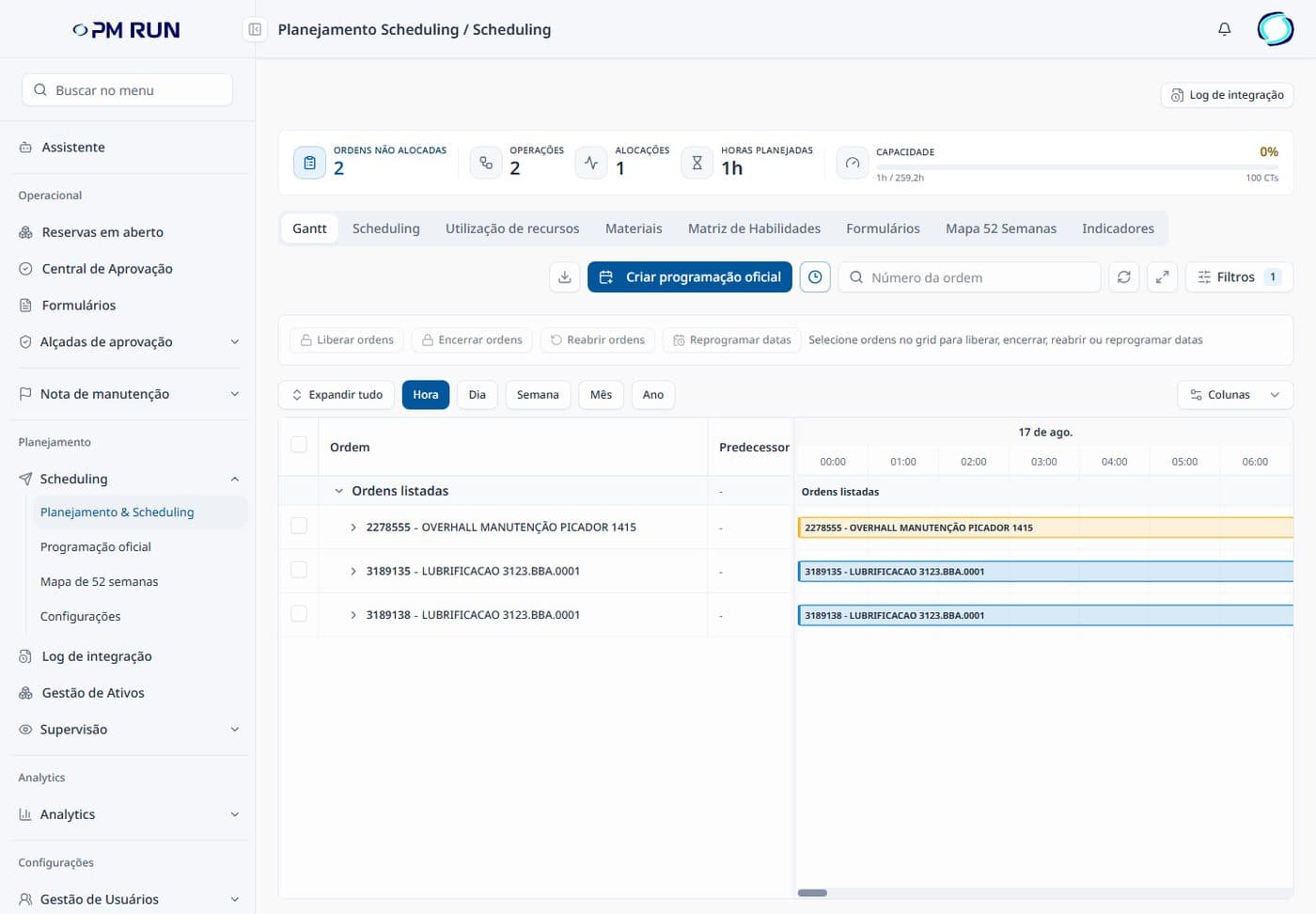
- Orders and capacity at the topUnallocated orders, operations, allocations, planned hours and work center capacity.
- Gantt and official scheduleOrders show as bars by hour, day, week, month or year, and one button starts the official schedule for the period.
- Integration log in viewA button at the top of the screen and a menu item open the log of the SAP integration.
- User management in the menuUsers and profiles are managed in the PM Run portal itself.
Results from teams running PM Run on SAP PM
At Citrosuco, technicians started recording notifications and photos directly on the order from their phones, with automatic sync to SAP PM.
Order confirmation rate above 95%
Citrosuco
At Rivelli, the team started receiving the order on a tablet and confirming it during the maintenance itself, and MTBF and MTTR tracking became more precise.
50% reduction in time spent on manual tasks
Rivelli Alimentos
Frequently asked questions
How much does PM Run cost?
PM Run has no published price. Pricing comes in a fixed-scope proposal that separates implementation and subscription and depends on the modules you choose (Mobility, Planning, routing and AI) and on the project scope. SAP licensing, devices, network and internal staff are outside it and stay in your internal budget.
Is SAP licensing for technicians included in the PM Run proposal?
No. SAP licensing for app users is handled directly with SAP, and the metric depends on your contract: named user, FUE under RISE with SAP, or SAP Digital Access, which counts documents created per year. Your SAP account team confirms which one applies.
Does PM Run support customization?
PM Run is sold as a standard version. Adjustments, development or customization beyond the standard are assessed separately and handled in their own proposal, apart from the product proposal.
Which SAP integration methods does PM Run support?
A web service exposed through SOAMANAGER, SAP PI, SAP CPI (Cloud Platform Integration), a direct RFC call or the company's own API integration platform. The PM Run team configures the integration, and IT grants users and access. When the choice runs through SAP Integration Suite, its subscription and consumption go into the IT budget.
Who hosts PM Run?
PM Run's cloud servers are PM Run's responsibility and part of the proposal. The app talks to the portal in the cloud over REST, and the cloud talks to SAP over SOAP. On the customer side are access to the SAP environments and firewall rules for geolocation, push notifications and voice transcription.
Does PM Run work with SAP ECC?
Yes. PM Run works with SAP PM on ECC 6.0 or S/4HANA, on-premise or in the cloud, and the integration methods apply to both versions.
How many SAP integration users does PM Run need?
Except with SAP PI, the integration can use one or more interface users in SAP, according to the company's security and licensing policy. Even with a single connection user, every document created in SAP records who did the work, through the employee ID linked to the app login.
Is PM Run implemented on-site?
Delivery is remote. User acceptance testing may include on-site work, with travel logistics covered on your side.
Related content
See PM Run running on SAP PM before you finalize the budget
You see the app and the portal running on SAP PM, module by module, and leave the demo knowing which modules go into scope and what stays with your IT team to finalize the budget.