Prometheus Group alternative for SAP PM
Prometheus Group is an international suite for maintenance planning, turnarounds, and mobility for SAP, Oracle, and IBM Maximo. PM Run is the execution and planning layer that runs on top of SAP PM, deployed and supported in Brazil by the Grupo ITSS team.

The Prometheus Group alternative for teams running SAP PM in Brazil
Prometheus Group offers an international asset management platform, with planning and scheduling, turnarounds, and mobility integrated with SAP, Oracle, and IBM Maximo. For teams running SAP PM that want to fix the daily maintenance routine, the alternative is PM Run: the execution and planning layer on top of SAP PM, with an offline field app and rollout and support by the Grupo ITSS team.
Free guides to plan and schedule in SAP PM
For planners running SAP PM who are comparing planning tools: check today's capacity, backlog, and schedule before watching demos.
When scheduling in SAP PM hits its limit
These signs usually show up before the search for a planning tool. They show where the routine loses time between scheduling, the field, and confirmation.
- The weekly schedule is built in a separate spreadsheetWhat was agreed with the crew is not what is released in SAP, and schedule compliance only shows up after the week is over.
- Crew capacity is counted by headcountThe week starts with more hours than the crew has, because vacations, shifts, and skills are left out of the math.
- Time confirmations reach SAP at the end of the shiftPlanners schedule the next week without knowing what actually finished in the previous one.
- Without signal, the order goes back to paperIn areas with no coverage, the technician writes it down and someone retypes it into SAP later.
With PM Run, scheduling and the field work on the same SAP PM
Planners build the week in the Gantt with capacity, shifts, absences, and skills, and create the official schedule integrated with SAP. The technician executes the order in the app, even offline, and the confirmation goes back to SAP PM, with the result of each submission in the Integration Log.
What PM Run delivers on top of SAP PM
Real features from the Mobility and Planning modules, all tied to SAP PM objects.
Orders created in the field mirroring IW31
The technician opens and executes the order on their phone with the fields of SAP's IW31 screen, including operations and reservations, and confirms the operation while doing the work.
Notifications with part, symptom, and cause catalogs
Failure reporting uses SAP PM's own catalogs, so equipment history is organized by part, symptom, and cause from the start.
QR Code measurement with limits
The inspector finds the equipment by QR Code, hierarchy, or list and enters the measuring point reading. A value outside the range requires a notification on the spot.
Reservations pulled from the bill of materials
Material reservations come from the equipment's bill of materials, with approval status and warehouse issue status, instead of a parallel request over chat.
Offline execution with sync
The app syncs a local base, and the technician keeps creating notifications, executing orders, and posting hours with no signal, sending everything to SAP once the connection returns.
Planning with Gantt and capacity
Planners work the backlog, the Gantt schedule, work center utilization, and crew skills, and send the official schedule for the period back to SAP.
The planner's week on one screen
This is how the Planning & Scheduling screen looks in the PM Run Planning portal.
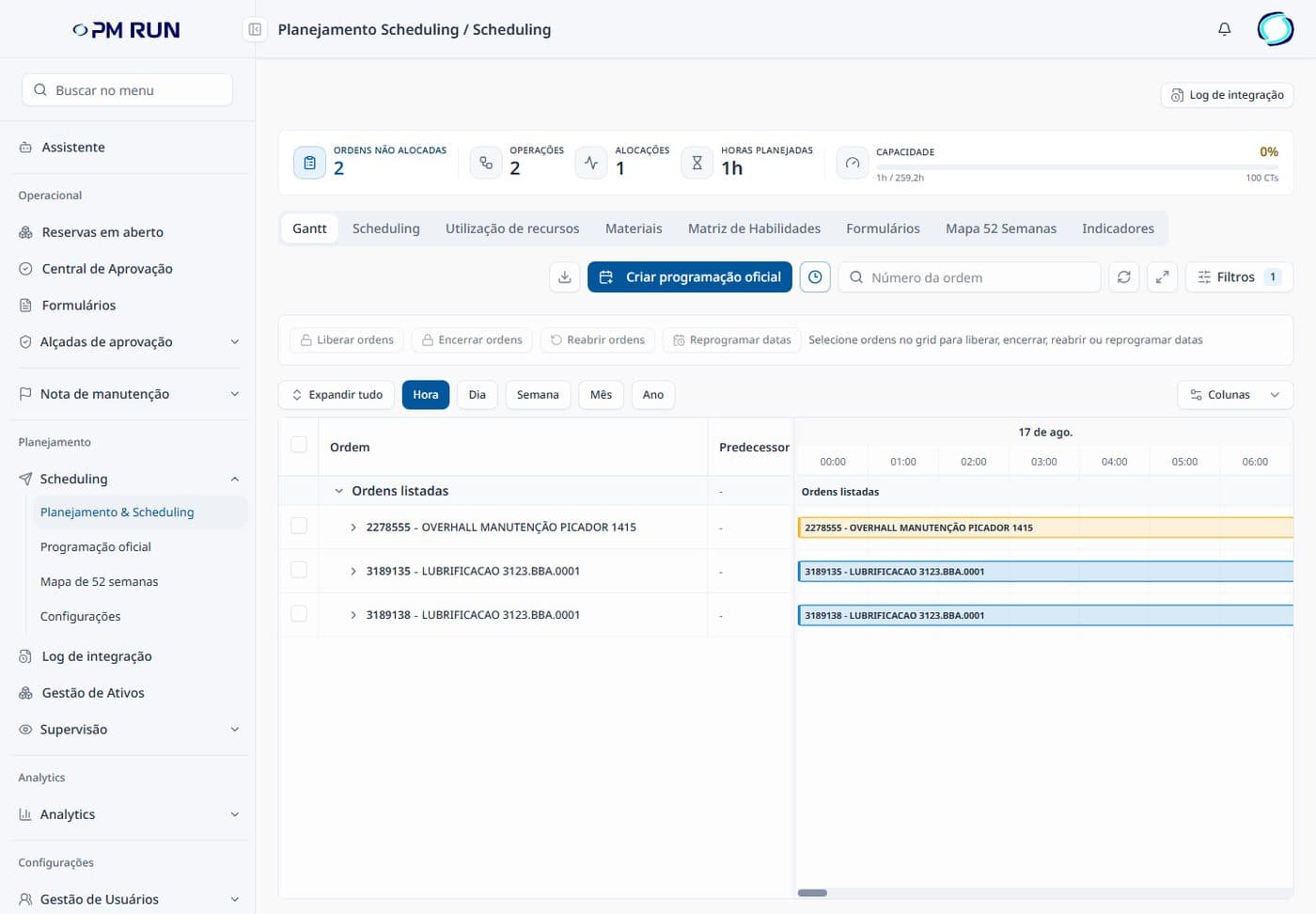
- Period countersUnallocated orders, operations, allocations, planned hours, and capacity sit at the top of the screen.
- Planning tabsGantt, Scheduling, resource utilization, materials, skills matrix, forms, 52-week map, and indicators.
- Official scheduleThe button to create the official schedule sits next to the actions to release, close, and reopen orders and reschedule dates.
- Gantt in five scalesThe schedule shows by hour, day, week, month, and year, with the integration log on the same screen.
How PM Run enters your operation
- 1
Diagnostic of the routine in your SAP PM
A 45-minute conversation with our SAP PM team to map how orders are created, who schedules the week, and where confirmation is lost today.
- 2
Package installed in your landscape
The /ITSSPM/ package is installed in your SAP and communication is configured through SOAMANAGER, PI, CPI, or RFC, together with your Basis team.
- 3
Pilot in one plant or one work center
The field team starts executing orders on their phones, with training and hands-on follow-up from the implementation team.
- 4
Expansion into Planning
The planning team takes over Gantt scheduling, with crew capacity and skills, and sends the official schedule for the period back to SAP.
Criteria you can confirm with every vendor on your own
| Criterion | What to confirm with each vendor | How PM Run works |
|---|---|---|
| Support language and time zone | Which language the team answers in, which time zone they cover, and who picks up when the line stops at night | Support in Portuguese during Brazilian business hours, delivered by the Grupo ITSS team; the field app is available in Portuguese, English, and Spanish |
| Who runs the rollout | Whether the vendor, a local partner, or your own team runs the implementation, and what it costs in time and money | Implementation, field team training, and follow-up run by Grupo ITSS in Brazil |
| Scope by module | Which modules are in the contract, which are out, and what changes in price when you add one | Mobility and Planning, contracted together or separately, depending on what the operation needs first |
| How it talks to your SAP | Which interfaces are used, what has to be installed in your landscape, and how you confirm the data reached the ERP | SOAMANAGER, PI, CPI, or RFC, with the /ITSSPM/ package in your landscape and an Integration Log flagging each message as success or failure |
| Working with no signal | Which objects the app creates and executes with no connection: notification, order, measurement, and time confirmation | A syncable offline base, with notification creation, order execution, and time posting without a connection |
| Indicators | Whether the indicators come in a ready-made dashboard or your team builds the dashboard from the data | Maintenance data delivered ready and automated so you build your own dashboard, with MTTR and MTBF by equipment, backlog by criticality, costs, and utilization |
When Prometheus Group can be the right call
According to its official website, Prometheus Group offers an asset management platform with modules for planning and scheduling, turnarounds, mobility, reporting, process safety, and master data, integrated with SAP, Oracle, and IBM Maximo. It makes sense when the company wants a single vendor for several of these fronts, at one facility or across many.
PM Run covers the maintenance routine of teams working on top of SAP PM: the order the technician executes, the notification opened when a machine stops, the inspection reading, and the schedule planners send back to SAP every week. Rollout, training, and support stay with the Grupo ITSS team in Brazil.
Field execution, confirmed in SAP
At Citrosuco, technicians started recording notes and photos directly on the order from their phones, with automatic sync to SAP PM.
Order confirmation rate above 95%
Citrosuco
At Rivelli, the team started receiving the order on the tablet and confirming it during the maintenance itself.
50% reduction in time spent on manual tasks
Rivelli Alimentos
Frequently asked questions
Does PM Run replace Prometheus Group?
It depends on the scope of your decision. Prometheus Group offers a broad platform, with planning, turnaround, mobility, and other modules for SAP, Oracle, and IBM Maximo. PM Run covers field execution and maintenance planning on top of SAP PM, with rollout and support in Brazil. Compare both propositions by the scope your operation will actually use.
Does SAP PM remain the system of record with PM Run?
Yes. SAP PM keeps holding equipment, functional locations, orders, and notifications. PM Run is the layer that takes the order, the notification, and the confirmation to the field and returns everything to SAP, and that gives planners Gantt scheduling with real capacity.
How does PM Run integrate with SAP PM?
Through SOAMANAGER, PI, CPI, or direct RFC, with the /ITSSPM/ package installed in the customer's landscape. Every notification, order, confirmation, reservation, and measurement document is recorded in the Integration Log as success or failure, so you confirm the data reached the ERP before the month-end close.
Where are rollout and support delivered from?
From Brazil. Implementation, field team training, and support are delivered by the Grupo ITSS team, in Portuguese and during Brazilian business hours. The field app itself is available in Portuguese, English, and Spanish. PM Run is part of Grupo ITSS and is used by more than 12,000 users.
What should I compare before deciding?
Compare four points you can confirm with each vendor on your own: which language and time zone support covers, who runs the rollout and what it costs in time and money, which modules are in the contract and which are out, and how the product talks to your SAP PM.
Does PM Run do predictive maintenance?
No. PM Run's scope is field execution and planning on top of SAP PM, without IoT, sensors, or predictive analytics. Its AI, Manu, suggests order allocation by skill, capacity, and availability in planning.
Is there free material to plan and schedule in SAP PM?
Yes. The article on real maintenance capacity shows what goes into the calculation and how to turn it into an executable schedule. The backlog article brings the formula with a full numerical example, and the maintenance schedule guide covers annual, monthly, and weekly horizons and the 52-week plan.
When should you replace the scheduling spreadsheet with planning software?
When the spreadsheet stops talking to SAP: the week is built outside it, capacity is counted by headcount, and schedule compliance only shows up afterwards. At that point, planning software on top of SAP PM builds the week with capacity, shifts, and skills and sends the official schedule back to SAP.
Related content
Book a demo of PM Run on top of your SAP PM
In the demo you follow the work order reaching the technician's phone, the confirmation going back into SAP PM and planning seeing what was executed in the field.