How to reduce reactive maintenance
Emergency repairs drop when preventive work gets done and every failure is recorded with cause, symptom and part. PM Run takes scheduled preventive work to the field, records the failure on the spot and delivers the data for your dashboard, on top of SAP PM.

How to reduce reactive maintenance in practice
Reducing reactive maintenance means trading the emergency breakdown for planned maintenance that gets done. In practice, it depends on executing scheduled preventive work, recording each failure with cause and symptom and tracking the indicators. PM Run takes this routine to the field, connected to SAP PM.
Free tools to tackle reactive work today
For teams starting from a spreadsheet: how to build the maintenance plan, how to calculate MTTR and MTBF and a method to find the cause of a repeat failure.
When reactive work takes over the week
The spreadsheet organizes the plan. These are the signs that reactive work grows because preventive work and the failure record never get finished.
- The scheduled preventive work order is pushed to the following weekThe order becomes backlog, and the equipment it should protect keeps running without the planned inspection.
- The failure notification only says the equipment brokeWithout cause, symptom and part, the SAP history does not show which failure repeats, and root cause analysis has nowhere to start.
- Machine downtime is estimated from memoryMTTR and MTBF come from a number someone remembered, and preventive priorities are set without a basis.
- Route readings stay on paperAn out-of-limit value does not become a notification in time, and the deviation only shows up when the equipment stops.
With PM Run, preventive work gets done and the failure becomes a record
The preventive orders from SAP PM reach the app with a checklist and time booking by operation. The technician opens the notification in the field with cause, symptom, part, photo and Machine Down, and an out-of-limit reading forces a notification. Everything goes back to SAP PM and feeds the equipment history.
What reduces reactive work day to day
Preventive work completed, failure well recorded and reliable data, all on top of SAP PM.
Preventive work executed in the field
The preventive orders from SAP PM reach the app with a checklist generated from the operation's long text.
Failure recorded on the spot
The technician opens the notification in the field with cause, symptom and part catalogs, and an attached photo.
Breakdown time measured
A notification with Machine Down marks the start of the breakdown, and SAP calculates the downtime when the order is closed.
Inspection readings with limits
An out-of-limit measuring point reading forces a notification before the deviation becomes a breakdown.
Workload before release
Planning shows the occupancy of each work center before the week's preventive work orders are released.
Data for your dashboard
PM Run delivers the data ready for you to build your own dashboard: MTTR and MTBF by equipment and class, backlog by criticality, costs and workload.
Daily follow-up
The daily Kanban separates overdue, open, released and in-progress orders, sorted by priority.
The inspection reading in the app
This is how the technician finds the measuring points of a piece of equipment and sees the last reading of each one.
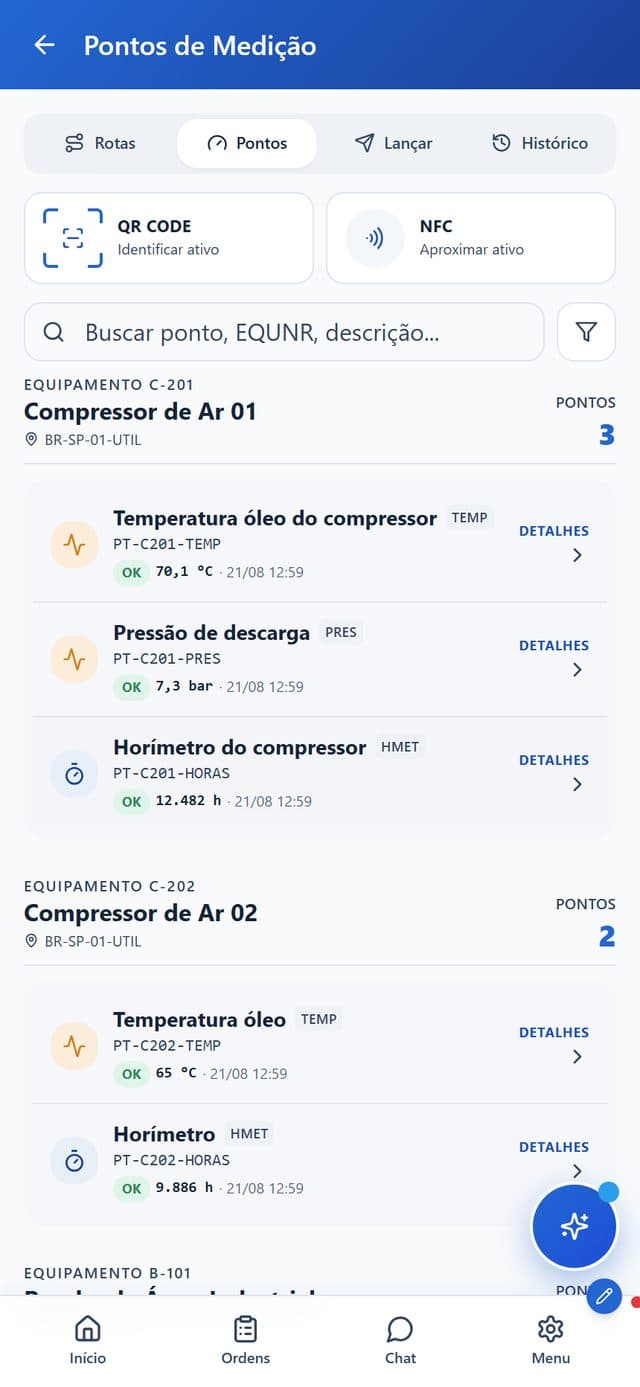
- Asset by QR Code or NFCThe technician identifies the equipment by scanning the code or tapping the phone.
- Points grouped by equipmentEach piece of equipment shows its points, such as oil temperature, discharge pressure and hour meter.
- Last reading and statusEach point shows the last value read, the reading date and the OK status.
- Routes, entry and historyTabs for routes, points, entry and history, plus search by point or equipment, sit on the same screen.
How PM Run pulls reactive work down
- 1
Schedule the preventive work that fits
The planner schedules the SAP PM preventive work orders while seeing the occupancy of each work center.
- 2
Complete preventive work in the field
The technician executes with a checklist and books the hours by operation, and execution shows up on the daily Kanban.
- 3
Record every failure to a standard
Each notification carries cause, symptom, part and photo, and Machine Down when the equipment stopped.
- 4
Read the measuring points
An out-of-limit reading forces a notification, and planning gets the deviation before the breakdown.
- 5
Analyze where the failure repeats
With the data ready, the manager builds the MTTR, MTBF and backlog dashboard and picks the asset to tackle first.
Reactive maintenance vs. maintenance with PM Run
| Day to day | Reactive maintenance | With PM Run on top of SAP PM |
|---|---|---|
| Source of the work | Emergency breakdown | Scheduled preventive work completed in the field |
| Failure record | Loose description, after the stoppage | Notification with cause, symptom, part and photo, on the spot |
| Breakdown time | Estimated from memory | Marked on the notification with Machine Down |
| Inspection reading | Paper checked later | An out-of-limit reading forces a notification |
| Indicators | Spreadsheet built by hand | Data ready for your MTTR, MTBF and backlog dashboard |
| Daily priority | Whatever shouted loudest | Daily Kanban with overdue orders and priority |
| Central record | Retyped into SAP later | Integrates with SAP PM, validated in the Integration Log |
Better records, fewer manual tasks
At Rivelli, the team receives the order on the tablet and confirms it during the maintenance, and MTBF and MTTR started being tracked with more precise data.
50% reduction in time spent on manual tasks
Rivelli Alimentos
At Citrosuco, technicians started recording notes and photos directly on the work order from their phones, with automatic sync to SAP PM.
Order confirmation rate above 95%
Citrosuco
Frequently asked questions
Does PM Run reduce reactive maintenance on its own?
There is no button that eliminates reactive work. PM Run takes scheduled preventive work to the field, records each failure with cause and symptom and feeds your indicators. With preventive work completed and reliable data, emergency reactive maintenance tends to fall.
Does PM Run do predictive maintenance?
No. PM Run does not predict failures. The reduction in reactive work comes from execution: preventive work scheduled in SAP PM reaches the field and gets done, the failure becomes a notification with cause, symptom and part, and an out-of-limit inspection reading forces a notification before the breakdown.
How does recording the failure help reduce reactive work?
The technician opens the notification in the field with cause, symptom and part catalogs, a photo and the Machine Down flag. This standardized record feeds the equipment history in SAP PM, shows where the failure repeats and gives a basis to review the preventive plan for that asset.
Does PM Run have a maintenance KPI dashboard?
PM Run delivers the maintenance data ready and automated from the execution in SAP PM. You build your own dashboard with the indicators that matter: MTTR and MTBF by equipment and class, backlog by criticality, costs and team workload.
Do I need to change SAP to reduce reactive maintenance?
No. PM Run runs on top of SAP PM, which remains the central record. It improves preventive execution and failure capture in the field, without creating a parallel system or replacing your ERP.
Is there a free guide to building a maintenance plan?
Yes. PM Run offers a step-by-step guide to the maintenance plan, from asset inventory and criticality to tasks, frequencies and schedule. The MTTR and MTBF guide shows how to calculate both indicators and track the effect of the plan.
When does a preventive spreadsheet stop being enough?
When the plan exists but execution falls short: preventive work is pushed back every week, the failure returns with no recorded cause and downtime is estimated from memory. At that point, what is missing is taking the preventive order to the technician's phone and bringing the recorded failure back to SAP PM.
Related content
Book a demo and see preventive work reach the technician's phone and failures return to SAP PM with cause and symptom
We show preventive work in the field, the failure record and the data ready for your dashboard, on top of SAP PM.