Manusis alternative for teams running SAP PM
Manusis is a CMMS and EAM platform with its own database. For teams that already have SAP PM as their system of record, PM Run takes execution to the field and scheduling to the planning team without creating a second registry of assets, orders, and materials.

The best Manusis alternative for teams already running SAP PM
Manusis is a CMMS and EAM platform with its own registry of assets, orders, plans, and materials, built for operations that want one central and independent system. For teams already running SAP PM, the alternative is PM Run: the execution, mobility, and planning layer that takes orders, notifications, and confirmations to the field and returns everything to SAP, which remains the system of record.
Free guides for the SAP PM routine
For teams running SAP PM that are evaluating a CMMS: see what the SAP you already have can deliver before building a second database.
When the SAP PM routine hits its limit
Before switching systems, check whether these signs show up in your plant. They point to a bottleneck between the field and SAP.
- The technician writes on paper and someone keys it into SAP laterHours, materials, and failures reach SAP late, and MTTR reflects what someone remembered at the end of the shift.
- The weekly schedule lives in a spreadsheet outside SAPWhat the crew agreed to is not what is released in SAP, and planners find the gap after the week is over.
- The new system asks for a second equipment registryEvery new asset, cost center change, and asset retirement has to happen in two places, in the same week.
- The CMMS indicator does not match the SAP costThe monthly close turns into reconciling two databases instead of analyzing the cause of the failure.
With PM Run, SAP PM stays the only database
The technician receives the order that already exists in SAP, follows the checklist, attaches the photo, and logs the hours during the job, even offline. On sync, everything goes back to SAP PM, and the Integration Log shows the result of each submission.
What PM Run delivers on top of SAP PM
Real capabilities from PM Run's Mobility and Planning modules, all tied to SAP PM.
Assets and orders that come from SAP PM
PM Run reads equipment, functional location, order, and notification straight from SAP PM. There is no second asset registry to keep up to date.
Field execution, online and offline
The technician creates and executes the order on their phone mirroring SAP's IW31 screen, with a checklist generated from the operation text, attached photo, and confirmation at the moment of execution.
Failure records with SAP catalogs
The notification starts in the field with the machine down flag, which records the start of the breakdown so SAP can calculate downtime, and with SAP PM's object part, damage, and cause catalogs.
Native integration with SAP PM
Notification, order, confirmation, reservation, and measurement document go up to SAP via SOAMANAGER, PI, CPI, or RFC, with a dedicated package installed in the customer's environment.
Integration Log
Every notification, order, and document is flagged as success or failure, so the team confirms the data reached the ERP without opening a reconciliation spreadsheet.
Planning on top of SAP
Backlog, Gantt scheduling, crew capacity, and manual allocation or allocation suggested by Manu, the AI that proposes how to distribute orders by skill, capacity, and availability.
The app works with SAP PM objects
This is the PM Run home menu the technician sees on the phone.
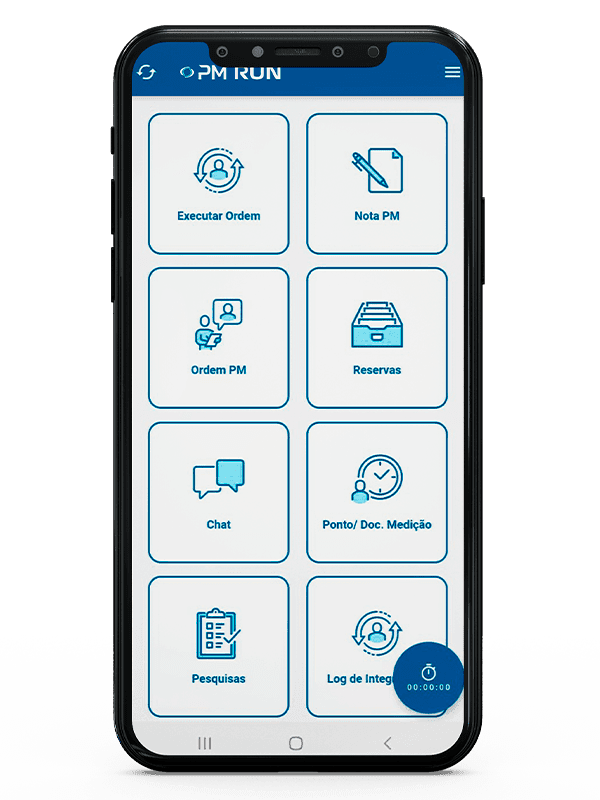
- Order executionThe first shortcut on the menu opens order execution.
- PM notification and PM orderNotification and order carry the names the team already uses in SAP PM.
- Reservations and measurementReservations and measurement points and documents sit in the same menu, next to chat and surveys.
- Integration LogThe Integration Log has its own shortcut on the app's home menu.
Manusis and PM Run side by side
| Criterion | Manusis | PM Run |
|---|---|---|
| Category | Independent CMMS and EAM platform | Execution, mobility, and planning layer on top of SAP PM |
| System of record | The software's own database | SAP PM itself (equipment, functional location, order, notification) |
| Asset registry | Its own registry, maintained inside the software | No parallel registry: the assets are the ones already in SAP PM |
| Field execution | Its own app, with offline mode and QR Code | Online and offline app mirroring IW31, with checklist and confirmation at the moment |
| ERP integration | Manusis Connect, for ERP and MES; SAP PM scope is confirmed with the vendor | SOAMANAGER, PI, CPI, or RFC, with an Integration Log document by document |
| Preventive strategy | Plans and frequencies defined inside the software | Strategy and frequency stay in SAP PM; PM Run schedules and executes |
| IoT and sensors | The Manusis website cites IoT, sensors, and predictive maintenance | Not part of PM Run's scope |
| Best fit | Operations that want one central, independent system, including without SAP | Operations already running SAP PM that want execution and planning on top of it |
When Manusis is the right choice
If your operation does not run SAP PM, an independent CMMS such as Manusis can be the central maintenance system. According to its official website, Manusis4 brings together asset management, work orders, inventory, PPE, an offline app, ERP and MES integration through Manusis Connect, plus IoT and AI. In that scenario, PM Run is not the right tool.
PM Run assumes SAP PM. It exists for the plant that already has equipment, orders, and notifications in SAP and wants field execution and maintenance scheduling to happen on top of that database, with no second registry in the middle.
Executed in the field, confirmed in SAP
At Citrosuco, technicians started recording notes and photos directly on the order from their phones, with automatic sync to SAP PM.
Order confirmation rate above 95%
Citrosuco
At Rivelli, the team started receiving the order on the tablet and confirming it during the maintenance itself.
50% reduction in time spent on manual tasks
Rivelli Alimentos
Frequently asked questions
Does PM Run replace Manusis?
It depends on your scenario. If your operation uses Manusis as the central maintenance system and does not run SAP PM, they are different propositions and a direct comparison does not help. If you already have SAP PM as the system of record, PM Run covers field execution, mobility, and planning on top of SAP, with no second asset and order registry to maintain.
What is the difference between Manusis and PM Run?
Manusis is an independent CMMS and EAM platform with its own database of assets, orders, and materials. PM Run is the execution, mobility, and planning layer that runs on top of SAP PM: the assets, orders, and notifications come from SAP itself, and PM Run takes execution to the field and returns the data to the ERP.
When is Manusis the better choice?
When the operation does not run SAP PM and wants a complete, independent maintenance system, with its own asset registry, inventory control, and reports in one place. In that scenario PM Run is not the right tool, because it assumes SAP PM as the system of record.
I am evaluating Manusis4. Does PM Run belong in the same comparison?
It does when the plant already runs SAP PM. In that situation, the main decision is where the asset registry will live. An independent CMMS creates a second database to keep up to date, and PM Run works on the database that already exists in SAP PM. If the operation has no SAP, the comparison does not apply.
Does PM Run have an app for the field technician?
Yes. The technician creates and executes the order on their phone mirroring SAP's IW31 screen, with a checklist generated from the operation text, attached photo, measurement point reading by QR code, and confirmation at the moment of execution, online or offline.
How does PM Run integrate with SAP PM?
Through SOAMANAGER, PI, CPI, or direct RFC, with a dedicated package installed in the customer's environment. Every notification, order, confirmation, reservation, and measurement document is recorded in the Integration Log as success or failure, so you can confirm the data reached the ERP.
Does PM Run have IoT and sensors, like Manusis?
No. The Manusis website cites IoT, sensors, and predictive maintenance, and that scope is outside PM Run. PM Run is the execution, mobility, and planning layer on top of SAP PM. Its AI, Manu, suggests order allocation by skill, capacity, and availability in planning.
Is there free material to organize the SAP PM routine?
Yes. The SAP PM module guide covers objects, work orders, essential transactions, and the KPIs that show results. The article on the SAP PM integration log shows how to check that field data actually reached SAP, and the one on late reporting shows how it weakens MTTR, backlog, and availability.
When does it make sense to replace SAP PM with an independent CMMS?
When maintenance is going to stop using SAP as its base, in a decision that involves the whole ERP. If SAP PM keeps holding assets, costs, and history, an independent CMMS creates a second database to keep up to date and reconcile every month. In that scenario, the alternative is to bring execution and scheduling on top of SAP PM itself.
Related content
Book a demo of PM Run on top of your SAP PM
In the demo you follow the work order reaching the technician's phone, the confirmation going back into SAP PM and planning seeing what was executed in the field.