The Fracttal alternative for SAP PM teams
Fracttal One is a cloud CMMS with its own database that also offers an integration with SAP. For teams that want to keep SAP PM as the core system, PM Run runs execution and planning on top of SAP PM itself: the order goes to the field and the confirmation returns to the ERP, with no second asset registry.

The best Fracttal alternative for teams already running SAP PM
Fracttal is a cloud CMMS for maintenance and asset management, with its own database and an integration with SAP. For teams that want to keep SAP PM as the central record, the alternative is PM Run: the execution and planning layer that runs on top of SAP PM, takes orders, notifications and confirmations to the field and returns everything to SAP.
Free guides to assess your SAP PM routine
For teams considering a system change that want to see first where the SAP PM routine loses time.
Where the SAP PM routine loses data today
These signs show where the SAP PM routine loses data before any system change.
- Technicians write the job on paper and someone types it into SAP at the end of the shiftConfirmations reach SAP PM from memory, and MTTR and order cost reflect what someone remembered.
- The weekly schedule lives in a spreadsheet outside SAPNobody knows which version the crew is following, and a rescheduled order does not return to SAP with its new date.
- Failure notifications go in without object part, damage and causeThe equipment history cannot support failure analysis or the review of the preventive plan.
- The new system under evaluation needs a second asset registryThe project now includes keeping two databases reconciled, on top of taking the order to the field.
With PM Run, SAP PM stays at the center
The technician receives the SAP PM order on the phone, executes it with a checklist and logs hours by operation, even offline. The planner builds the week in the Gantt and creates the official schedule integrated with SAP. The Integration Log shows the result of each submission.
What PM Run delivers on top of SAP PM
Features from the Mobility and Planning modules, all connected to SAP PM.
Orders and notifications from SAP PM
PM Run reads equipment, functional location, order and notification straight from SAP PM. Your team keeps no second asset registry to reconcile.
Field execution, online and offline
The technician creates and executes the order on the phone mirroring SAP's IW31 screen, with a checklist generated from the operation text, an attached photo and confirmation on the spot.
Native integration with SAP PM
Notification, order, confirmation, reservation and measurement document flow into SAP via SOAMANAGER, PI, CPI or RFC, with a dedicated package installed in the customer's environment.
Integration Log
Each notification, order and document is recorded as success or failure, so your team confirms the data reached the ERP.
Planning on top of SAP
Backlog, Gantt scheduling, crew capacity and allocation suggested by Manu, PM Run's AI, by skill and availability.
Data ready for your dashboard
PM Run delivers the data ready for your team to build its own dashboard: MTTR and MTBF by equipment, backlog by criticality, costs and utilization.
SAP PM objects in the technician's app
This is how the PM Run app home menu organizes field work on top of SAP PM.
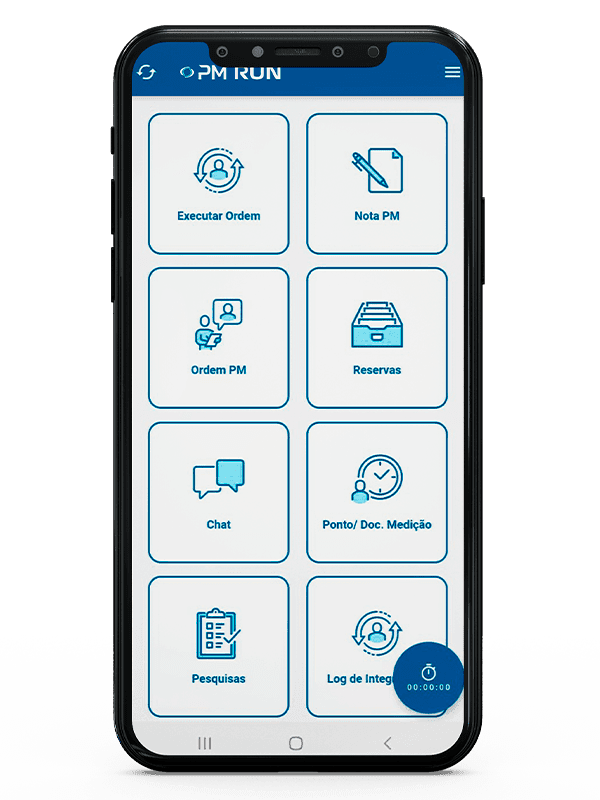
- Execute orderThe first shortcut in the menu opens order execution.
- PM notification and PM orderDedicated shortcuts for the SAP PM notification and order.
- Reservations and measurementMaterial reservation and equipment measurement sit in the same menu.
- Integration LogThe Integration Log has its own shortcut in the app menu.
Fracttal and PM Run side by side
| Criterion | Fracttal | PM Run |
|---|---|---|
| Category | Cloud CMMS (Fracttal One) with its own database | Execution and planning layer on top of SAP PM |
| System of record | The Fracttal One database. At the Fracttal with SAP PM level, work orders are managed in SAP PM and Fracttal One becomes the field technicians' tool | SAP PM itself (equipment, location, order, notification) |
| Asset registry | Maintained inside the platform | Comes from SAP PM, with no second database to reconcile |
| SAP integration | Integration with SAP solutions in three levels, as an SAP Silver Partner | Native to SAP PM, via SOAMANAGER, PI, CPI or RFC, with Integration Log |
| Field execution | Fracttal One app | Online and offline app mirroring IW31, with checklist and confirmation by operation |
| Condition monitoring | Fracttal Sense, with sensors and an IoT gateway | Out of scope: PM Run does not use sensors or IoT |
| Indicators | Its own reports and connection to Power BI, Tableau or Qlik Sense | Data ready for your team to build its own KPI dashboard |
| Best fit | Teams that want the CMMS as the core maintenance system, with or without SAP | Teams that want SAP PM as the single record, with execution taken to the field on top of it |
Field execution, confirmed in SAP
At Citrosuco, technicians started recording notes and photos directly on the order from their phones, with automatic sync to SAP PM.
Order confirmation rate above 95%
Citrosuco
At Rivelli, the team started receiving the order on the tablet and confirming it during the maintenance itself, with more accurate MTBF and MTTR tracking.
50% reduction in time spent on manual tasks
Rivelli Alimentos
Frequently asked questions
Does PM Run replace Fracttal?
It depends on your scenario. If your operation uses Fracttal as its central CMMS and does not run SAP PM, they are different propositions. If SAP PM is already your system of record, PM Run covers execution, mobility and planning on top of SAP itself, with no second registry of assets and orders.
What is the difference between Fracttal and PM Run?
Fracttal One is a cloud CMMS with its own database of assets, orders and plans, and it offers an integration with SAP. PM Run is the execution and planning layer that runs on top of SAP PM: assets, orders and notifications come from SAP itself, and PM Run takes execution to the field and returns the data to the ERP.
When is Fracttal the better choice?
When the operation does not run SAP PM, or wants the CMMS as its central maintenance system, with its own registry of assets, plans and reports. In that scenario, PM Run is not the right tool.
Does PM Run have sensors and IoT like Fracttal?
No. Fracttal offers Fracttal Sense, with sensors and an IoT gateway for condition-based maintenance. PM Run does not use sensors or IoT and does not do predictive maintenance: it covers field execution and planning on top of SAP PM. In planning, Manu, PM Run's AI assistant, suggests order allocation by skill and availability.
How does PM Run integrate with SAP PM?
Through SOAMANAGER, PI, CPI, or direct RFC, with a dedicated package installed in the customer's environment. Each notification, order, and document is recorded in the Integration Log as success or failure, so you can confirm the data reached the ERP.
How do you compare the cost of a cloud CMMS with PM Run?
Comparing list prices is misleading, because the two solve different scopes. Teams already running SAP PM have to add, on top of the CMMS license, the effort of integrating both systems, keeping two asset registries, and reconciling information between the databases.
Is there a free guide to organize the SAP PM routine?
Yes. The SAP PM module guide covers the objects and transactions that matter, how to structure the module to cut planning rework and the KPIs that show results. It helps fix the routine before deciding whether the operation needs another system.
Related content
Book a demo of PM Run on top of your SAP PM
In the demo you follow the work order reaching the technician's phone, the confirmation going back into SAP PM and planning seeing what was executed in the field.