Produttivo or PM Run for teams running SAP PM
Produttivo is a system and app for managing field teams, from service request to billing. PM Run is the execution layer for industrial maintenance on top of SAP PM: the SAP order goes to the technician's phone, and the confirmation, the notification and the measurement go back to the ERP.

The difference between PM Run and Produttivo
Produttivo is a system and app for managing field teams, with service requests, work orders, checklists, reports and billing, used in segments such as building maintenance, air conditioning and fleet. PM Run is the execution layer for industrial maintenance on top of SAP PM: it takes orders, notifications and measurements from SAP to the field and returns everything to the ERP. Each one serves a different audience.
Free templates to standardize the work order today
For teams that still track work orders on paper or spreadsheets, or want to fix the SAP PM routine before choosing a system.
When work orders outside SAP PM stop working
A template standardizes the order. These are the signs that the problem has become the path of the order between the field and SAP PM.
- The order is executed outside SAP and typed in again laterThe same work order now lives in two places, and the confirmation reaches SAP PM late and incomplete.
- The failure is described in free textWithout object part, damage and cause from the SAP catalog, the equipment history cannot support failure analysis.
- Route readings stay on the clipboardThe measurement document reaches SAP days later, and a reading outside the limit does not become a notification on the spot.
- Material for the order is requested by messageThe reservation is not tied to the order in SAP, and the equipment's material cost comes out incomplete.
With PM Run, the field work order is the SAP PM order itself
The technician executes the order that came from SAP PM, records the notification with the object part, damage and cause catalogs, logs the measurement through the equipment's QR Code and reserves material from the bill of materials. On sync, everything goes to SAP, and the Integration Log shows the result of each submission.
What PM Run delivers for industrial maintenance with SAP PM
Features from the Mobility and Planning modules, all tied to SAP PM objects.
Order mirroring IW31
The technician creates and executes the order on the phone with the fields of SAP's IW31 screen, including operations and reservations.
Measuring point and document
The reading is taken through the equipment's QR Code, and a reading outside the limit makes the technician open a notification.
Material reservation
The reservation pulls the equipment's bill of materials, with an approval status.
SAP failure catalogs
The notification uses the object part, damage and cause catalogs, and the machine-down button records the start of the breakdown and calculates downtime.
Planning for maintenance planners
Backlog, Gantt scheduling, crew capacity and order allocation, manual or suggested by AI, by skill and availability.
Native integration with SAP PM
Notification, order, confirmation and measurement document go to SAP, and the Integration Log marks each submission as success or failure.
Equipment measurement in the technician's hands
This is how the measuring points of a piece of equipment look in the PM Run app.
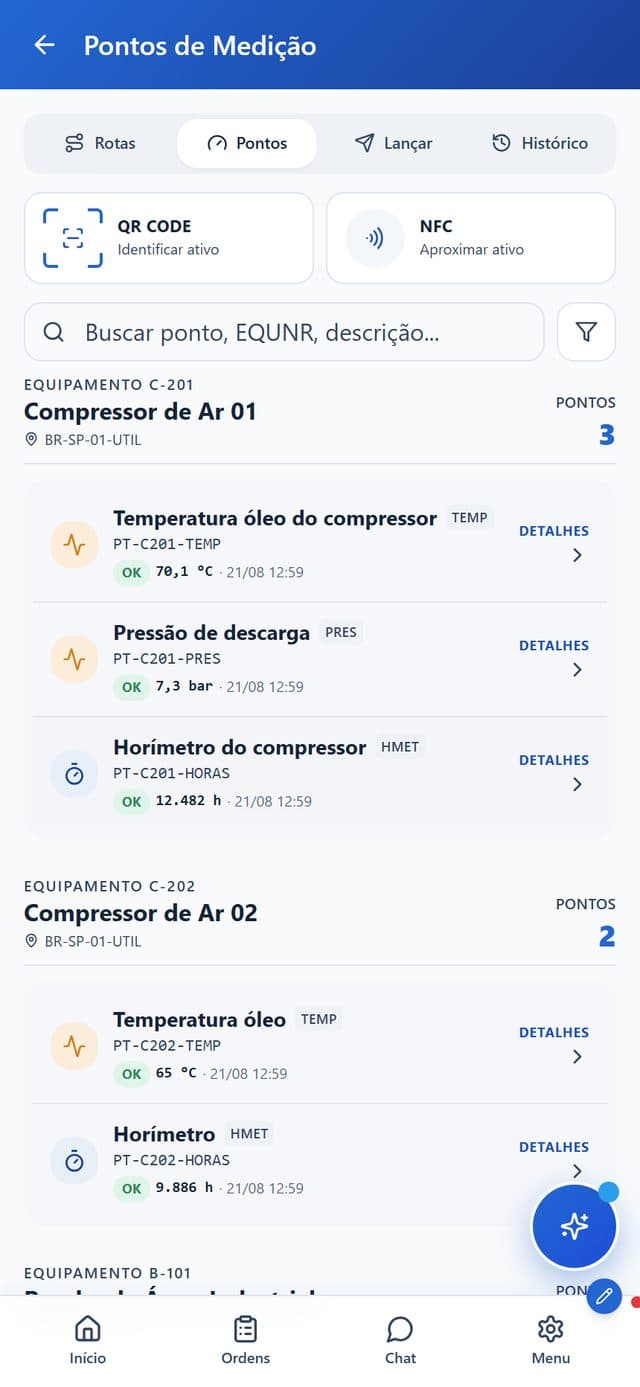
- Asset identificationThe technician identifies the equipment by QR Code or NFC.
- Search by point or equipmentA search field finds the measuring point or the equipment.
- Routes, points, entry and historyTabs separate the routes, the points, the reading entry and the history.
- Last value and statusEach point shows the last value read and its OK status.
Produttivo and PM Run side by side
| Criterion | Produttivo | PM Run |
|---|---|---|
| Focus | Field team management, from service request to billing | Industrial maintenance execution on top of SAP PM |
| Typical audience | Field service and maintenance teams in segments such as building maintenance, HVAC and fleet | Industrial plants running SAP PM |
| System of record | The platform's own database | SAP PM itself (equipment, location, order, notification) |
| Maintenance objects | Work order, checklist and report | IW31 order, notification with catalogs, measuring point, reservation with bill of materials |
| ERP integration | Omie and Conta Azul, plus an API; check with the vendor about SAP PM | Native to SAP PM, via SOAMANAGER, PI, CPI or RFC, with Integration Log |
| Field execution | App with order, checklist and report, with forms that work offline | Online and offline app mirroring IW31, with confirmation by operation |
| Planning | Team calendar, route planning and recurring plans | Gantt, crew capacity and official schedule integrated with SAP |
SAP PM orders executed in the field
At Rivelli, the team started receiving the order on the tablet and confirming it during the maintenance itself, taking the work order off paper.
50% reduction in time spent on manual tasks
Rivelli Alimentos
At Citrosuco, technicians started recording notes and photos directly on the order from their phones, with automatic sync to SAP PM.
Order confirmation rate above 95%
Citrosuco
Frequently asked questions
Does PM Run replace Produttivo?
It depends on the operation. Produttivo serves field teams with service requests, work orders, checklists and reports. PM Run is for industrial maintenance that has SAP PM as its record. If your plant runs SAP PM, PM Run takes the SAP order to the field; for field service outside SAP, Produttivo covers that case.
What is the difference between PM Run and Produttivo?
Produttivo is a field team management system and app with its own database. PM Run is the execution layer for industrial maintenance on top of SAP PM: order mirroring IW31, notification with failure catalogs, measuring point, reservation from the bill of materials and native integration with SAP.
Is PM Run suitable for technical support and general services?
PM Run specializes in industrial maintenance integrated with SAP PM. For technical support and field service outside a SAP PM environment, a general work order tool such as Produttivo tends to be a better fit.
Does PM Run integrate with SAP PM?
Yes, natively. It talks to SAP PM through the module's real objects: notification, order mirroring IW31, confirmation, reservation and measurement document, with the Integration Log validating each submission to the ERP.
Does PM Run work offline in the field?
Yes. After syncing, the technician executes the order, fills in the checklist, attaches a photo and logs the confirmation without a signal, and the data flows into SAP when the connection returns.
Is there a free maintenance work order template?
Yes. PM Run offers three free maintenance work order templates in Word, Excel and PDF, plus a maintenance checklist template. They help standardize the order while it still runs on paper or in spreadsheets.
When should work orders move from paper to a system tied to SAP PM?
When the problem is no longer the order format but its path to SAP: hours typed at the end of the shift, failures described in free text, readings left on a clipboard and material requested by message. At that point, executing the SAP PM order itself on the phone removes the retyping.
Related content
Book a demo of PM Run for your industrial maintenance
In the demo you follow the work order reaching the technician's phone, the confirmation going back into SAP PM and planning seeing what was executed in the field.